layout: true <nav> <span>Web integration and best practices with preprocessors and frontend frameworks by <strong>Manon Carbonnel</strong></span> <span style="float: right">2020</span> </nav> --- class: cover .highlight[] # Web integration .subtitle[Best practices in CSS: Integration with preprocessors and frontend frameworks] .line[] .image-center[  ] --- class: content .highlight[] ## Some reminders .subtitle[CSS with superpowers] .line[] Preprocessors are backwards-compatible language extensions for CSS. They only make a few convenient additions to the CSS language, which is one of the reasons it can be learned so quickly. .image-mini[  ] Leaner Style Sheets .image-mini[  ] Syntactically Awesome Style Sheets --- class: content .highlight[] ## Nesting .subtitle[Hierarchy and scopes] .line[] .col[ When writing HTML you've probably noticed that it has a clear nested and visual hierarchy. CSS, on the other hand, doesn't: ```css nav ul { margin: 0; padding: 0; list-style: none; } nav li { display: inline-block; } nav a { display: block; padding: 6px 12px; text-decoration: none; } ``` ] .col[ ] --- class: content .highlight[] ## Nesting .subtitle[Hierarchy and scopes] .line[] .col[ When writing HTML you've probably noticed that it has a clear nested and visual hierarchy. CSS, on the other hand, doesn't: ```css nav ul { margin: 0; padding: 0; list-style: none; } nav li { display: inline-block; } nav a { display: block; padding: 6px 12px; text-decoration: none; } ``` ] .col[ Preprocessors will let you nest your CSS selectors in a way that follows the same visual hierarchy of your HTML. *Overly nested rules is considered bad practice.* ```scss // SCSS or LESS nav { ul { margin: 0; padding: 0; list-style: none; } li { display: inline-block; } a { display: block; padding: 6px 12px; text-decoration: none; } } ``` ] --- class: content .highlight[] ## Variables .subtitle[Reusability] .line[] .col[ It's not uncommon to see the same value repeated dozens if not hundreds of times across your stylesheets: ```css .link { color: #428bca; } .widget { color: #fff; background: #428bca; } ``` ] .col[ ] --- class: content .highlight[] ## Variables .subtitle[Reusable] .line[] .col[ It's not uncommon to see the same value repeated dozens if not hundreds of times across your stylesheets: ```css .link { color: #428bca; } .widget { color: #fff; background: #428bca; } ``` ] .col[ Variables make your code easier to maintain by giving you a way to control those values from a single location. You can store things like colors, font stacks, or any CSS value you think you'll want to reuse. .col[ ```less // LESS @sea-blue: #428bca; .link { color: @sea-blue; } .widget { color: #fff; background: @sea-blue; } ``` ] .col[ ```scss // SCSS $sea-blue: #428bca; .link { color: $sea-blue; } .widget { color: #fff; background: $sea-blue; } ``` ] ] --- class: content .highlight[] ## Variables .subtitle[Parent selectors] .line[] .col[ The `&` operator represents the parent selectors of a nested rule: ```less // SCSS or LESS a { color: blue; &:hover { color: green; } } ``` ] .col[ ] --- class: content .highlight[] ## Variables .subtitle[Parent selectors] .line[] .col[ The & operator represents the parent selectors of a nested rule: ```less // SCSS or LESS a { color: blue; &:hover { color: green; } } ``` ] .col[ It also works with class names and helps managing *scopes*: ```less // SCSS or LESS .navbar { color: blue; &-button { // output : .navbar-button in CSS color: green; } } ``` Really cool when using naming conventions such as BEM. ] --- class: content .highlight[] ## Partials .subtitle[Make it modular] .line[] A partial is a Sass or Less file named with a leading underscore. You might name it something like `_partial.scss` or `_partial.less`. The underscore lets the preprocessor know that the file is only a partial file and that it should not be generated into a CSS file. Partials are used with the **@import** rule. ```scss // LESS or SCSS @import "partial"; // No need to include the file extension ``` .line[] **In SASS, the @import rule is going to be, slowly but surely, deprecated and replaced with the @use rule. It is still used in frontend frameworks though.** You can use the sass-migrator tool and module migration to help you update your code [https://sass-lang.com/documentation/cli/migrator](https://sass-lang.com/documentation/cli/migrator). --- class: content .highlight[] ## Sass Modules .subtitle[Make it modular] .line[] A module is like a partial with a namespace added to it. Sass modules are also used with the **@use** rule. ```scss // _module.scss $primary-color: #333; ``` ```scss // SCSS @use 'module'; .inverse { background-color: module.$primary-color; color: white; } ``` --- class: content .highlight[] ## Mixins .subtitle["mix-in" properties from existing styles] .line[] A mixin lets you make groups of CSS declarations that you want to **reuse** throughout your stylesheets. You can even pass in values to make your mixin more flexible. *A good use of a mixin is for *vendor prefixes* (non standard or experimental rules), but I prefer using an autoprefixer* .col[ ```scss // SCSS @mixin transform($property) { -webkit-transform: $property; -ms-transform: $property; transform: $property; } .box { @include transform(rotate(30deg)); } ``` ] .col[ ```css /* CSS */ .box { -webkit-transform: rotate(30deg); -ms-transform: rotate(30deg); transform: rotate(30deg); } ``` ] --- class: content .highlight[] ## Mixins .subtitle[Use a rule as a mixin] .line[] .col[ ```less // LESS .my-mixin { color: black; } .my-other-mixin() { background: white; } .class { .my-mixin(); .my-other-mixin(); } ``` ] .col[ ```css /* CSS */ .my-mixin { color: black; } .class { color: black; background: white; } ``` ] --- class: content .highlight[] ## Less functions .subtitle[Use a function inside a rule] .line[] Less offers you many built-in functions to use in your stylesheets. I do not use a lot of them, except for the color operations. They all require the same parameters : * `color`: A color object. * `amount`: A percentage 0-100%. * `method`: Optional, set to relative for the adjustment to be relative to the current value. .line[] .col[ ```less // LESS .elem:hover { color: saturate(#80e619, 20%); color: desaturate(#80e619, 20%); color: lighten(#80e619, 20%); color: darken(#80e619, 20%); } ``` ] .col[ .line[] .image-mini-block[ 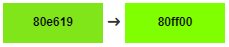 ] .image-mini-block[ 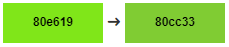 ] .image-mini-block[ 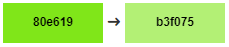 ] .image-mini-block[  ] ] --- class: content .highlight[] ## Code quality .subtitle[] .line[] .image-center[  ] --- class: content .highlight[] ## Code quality .subtitle[Linters and post-processors] .line[] .col[ [Stylelint](https://github.com/stylelint/stylelint) is a linter that helps you avoid errors and enforce conventions in your stylesheets. You can configure it to work in your favorite Jetbrains IDE. Voir le [README.md](../../../quality-tools-tutorials/stylelint/README.md). .line[] .line[] .line[] .line[] .image-mini[  ] ] .col[ [PostCSS](https://github.com/postcss/postcss) is a tool for transforming styles with JS plugins. It offers more than 200 plugins, here are a few nice ones: - [autoprefixer](https://github.com/postcss/autoprefixer) (automatically ads vendor prefixes to your rules) - [stylelint](https://github.com/stylelint/stylelint) (a modular stylesheet linter). - [doiuse](https://github.com/anandthakker/doiuse) (lints CSS for browser support). See the PostCSS [README.md](../../../quality-tools-tutorials/post-css/README.md). .image-mini[  ] ] --- class: content .highlight[] ## Source maps .subtitle[Identify the source of a rule] .line[] A **source map** is a special file that connects a minified/uglified version of an asset (CSS or JS) to the original authored version. Very useful to debug CSS rules. But should you use them in **production environment** ? It's up to you because, they are quite lightweight. --- class: content .highlight[] ## Compilation .subtitle[] .line[] .image-center[  ] --- class: content .highlight[] ## Command line usage .subtitle[Build-in commands] .line[] You can compile your `.scss` ou `.less` files using the command line build in tools. .col[ .image-mini[  ] The binary included, `bin/lessc`, works with NodeJS. It offers a simple but limited [build command](http://lesscss.org/usage/#command-line-usage-command-line-usage), and a [watch configuration](http://lesscss.org/usage/#using-less-in-the-browser-watch-mode): ```shell-script $ lessc bootstrap.less bootstrap.css ``` It has a source maps option : ```shell-script $ lessc bootstrap.less bootstrap.css --source-map ``` ] .col[ .image-mini[  ] This preprocessor offers a richer [Dart Sass executable](https://sass-lang.com/documentation/cli/dart-sass) with different modes: ```shell-script $ sass style.scss:style.css $ sass light.scss:light.css dark.scss:dark.css $ sass themes:public/css ``` And offers a `watch` command line: ```shell-script $ sass --watch themes:public/css ``` It also has more options like compression and source maps options: ```shell-script $ sass --style=compressed style.scss:style.min.css ``` ] --- class: content .highlight[] ## Task runners .subtitle[IDE integration] .line[] Jetbrains' IDE offer compilation tools and watchers for preprocessors. It uses the preprocessor's built-in command line tools. See the SASS [README.md](../../../quality-tools-tutorials/sass/README.md#file-watchers) and LESS [README.md](../../../quality-tools-tutorials/less/README.md#file-watchers). .line[] .image-mini[  ] .image-mini[  ] .image-mini[  ] .image-mini[  ] .image-mini[  ] .image-mini[  ] --- class: content .highlight[] ## Task runners .subtitle[Webpack] .line[] You also can use external task runner programs to compile your stylesheets. A good example is [Webpack](https://webpack.js.org/) because it also optimizes `.js` and image files. .line[] This task runner support [styling loaders](https://webpack.js.org/loaders/#styling) dedicated to SASS and LESS, but also code quality ones such as PostCSS. See the WebPack [README.md](../../../quality-tools-tutorials/webpack/README.md). .line[] .image-mini[  ] --- class: content .highlight[] ## Frontend frameworks .subtitle[] .line[] .image-center[  ] --- class: content .highlight[] ## Frontend frameworks .subtitle[] .line[] .col[ I strongly advise you to use a frontend framework like **Bootstrap**, **Materialize** or **Bulma** ... They contain CSS and JS prepacked components. .line[] .line[] .image-mini[  ] .image-mini[  ] .image-mini[  ] ] .col[ Install them using a package manager like **NPM**, **Yarn**... Version and share only your configuration files for building the project. .line[] .line[] .image-mini[  ] .image-mini[  ] ] --- class: content .highlight[] ## Frontend frameworks .subtitle[] .line[] Once you installed the framework, look at its stylesheets architecture. **Try to respect the same one in your project stylesheets.** .col[ For example, **Bootstrap** uses Sass: .image-max-height[  ] ] .col[ Architecture of my project: .image-max-height[  ] ] --- class: content .highlight[] ## Frontend frameworks .subtitle[] .line[] There is two ways you can load the framework stylesheets in your project. **1** You can charge its dist minified file separately from your project main CSS: ```html <head> <!-- Bootstrap framework stylesheet --> <link href="node_modules/bootstrap/dist/css/bootstrap.min.css" rel="stylesheet"/> <!-- Core theme CSS --> <link href="scss/dist/css/theme.min.css" rel="stylesheet"/> </head> ``` .line[] **2** Or you can `@import` it in your main `theme.scss` entrypoint file and load the framework's .scss entry point file. Either the whole framework stylesheets *or* the variables and any component stylesheet you might need, allowing you to **override** as needed. .col[ ```html <head> <!-- Core theme CSS (includes Bootstrap) --> <link href="scss/dist/css/theme.min.css" rel="stylesheet"/> </head> ``` ] .col[ ```scss /* Libraries */ @import '../node_modules/bootstrap/scss/bootstrap'; /* Custom variables */ @use 'variables'; /* Components */ @use 'components/badges'; @use 'components/buttons'; @use 'components/cards'; @use 'components/forms'; /* Global */ @use 'layout'; ``` ] --- class: cover .highlight[] # Thanks ! .line[] .line[] .image-center[  ]